Most people who download a money tracker app stop using it within weeks. The app was rarely bad — it was just the wrong kind for how they actually handle money. Ever since Intuit shut down Mint in 2024, millions of people have been looking for a replacement, and the choice comes down to one question before any feature list: how do you want your transactions to get into the app?
The three kinds of money tracker apps
1. Bank-linked apps. Apps like YNAB and Monarch Money connect to your bank and import transactions automatically. The upside is less typing. The trade-offs: most charge a subscription, you hand over access to your accounts, and imports often need correcting because a bank's merchant name rarely matches a useful category. Cash and money between friends never shows up at all.
2. Spreadsheets and templates. Completely flexible and free. Also the easiest to abandon, because entering a transaction means opening a laptop, finding the right row, and remembering the formula. Spreadsheets are great at analysis and bad at the ten-second habit that tracking depends on.
3. Manual, on-device apps. You log each transaction yourself, in seconds, and the data stays on your phone. No bank connection, no account, usually works offline. The trade-off is that nothing is automatic — but that is also why people who use them tend to actually know where their money went, because they saw every transaction go in.
5 things the best money tracker app gets right
- Logging takes under ten seconds. If adding a coffee takes longer than drinking it, you will stop. Speed of entry predicts long-term use better than any other feature.
- Few categories, not dozens. Three to six broad buckets you can label yourself beat forty preset categories you have to scroll through. The 50/30/20 rule works for exactly this reason.
- It tracks debts, not just spending. Most apps ignore money you lent or borrowed. If you split bills or lend to family, you need a separate view of who owes what — see how to track debts properly.
- You know where your data lives. Stored on your phone, on the company's servers, or with a bank-aggregation service? Each is a legitimate choice, but you should know which one you made.
- You can get your data out. Export to a file you control — PDF, Excel, or a backup — means you are never locked in if you switch apps.
A quick bonus check if you travel, freelance, or get paid from abroad: multi-currency support. Apps that force everything into one currency make mixed totals meaningless.
Which kind fits you?
- Mostly card payments, want automation, happy to pay: a bank-linked app.
- Love analysis and building your own system: a spreadsheet.
- Want privacy, use cash, lend or borrow money, or just want something simple that works offline: a manual, on-device money tracker.
Where MoniTabs fits
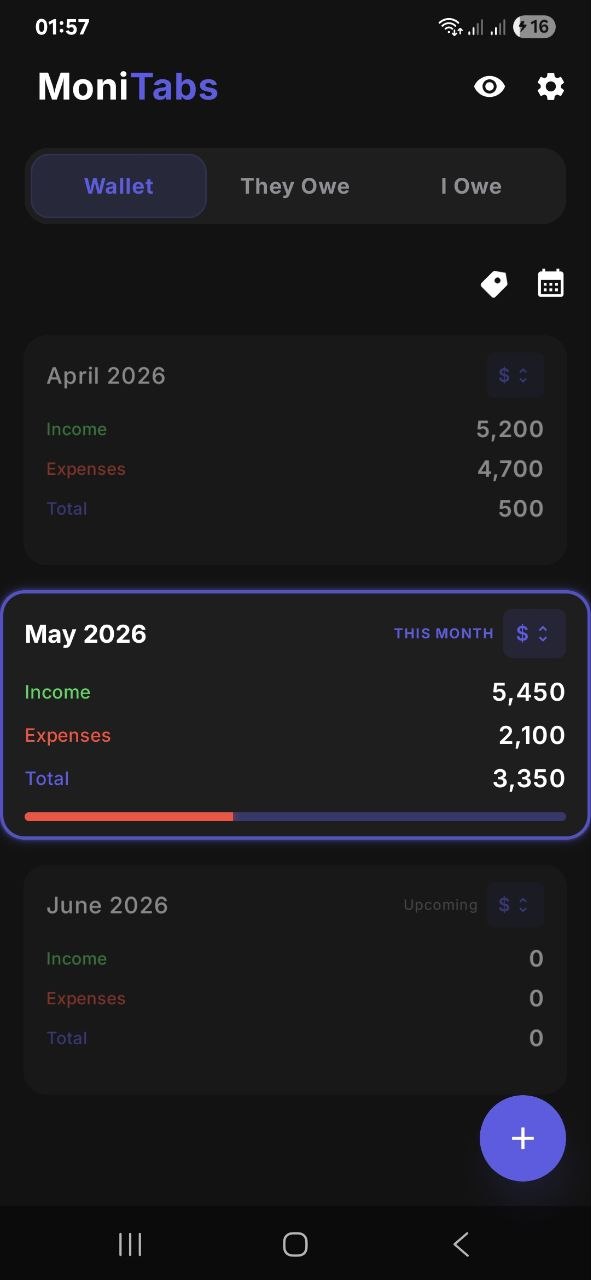
MoniTabs is a manual, on-device money tracker for Android — so it sits in the third group. Its Wallet tab tracks income and spending in three built-in categories (Needs, Wants, and Debts & Savings) with your own labels inside each, a monthly calendar view, and pie charts. Unlike most money trackers, it also has two dedicated debt tabs: I Owe and They Owe, with remaining balances, partial repayments, and reminders. It supports multiple currencies, exports PDF and Excel reports, and needs no account — your financial data stays on your device.
To be straightforward about the trade-off: MoniTabs does not connect to your bank, so every transaction is entered by hand. If automatic imports matter most to you, a bank-linked app is the better fit. MoniTabs is free with ads, and one short video removes them for six hours.
Frequently asked questions
What is the best money tracker app?
There is no single best money tracker app for everyone. Bank-linked apps suit people with many card transactions who are comfortable connecting their accounts. Manual on-device trackers suit people who want privacy, work offline, or need to track cash and debts. The best one is the one you will still be using in three months.
Does a money tracker app need access to my bank account?
No. Bank-linked apps import transactions automatically, but many money tracker apps work entirely from what you enter yourself, with no bank connection and no account.
Can a money tracker app also track debts?
Some can, but most only track spending. If you lend or borrow money, look for an app that tracks what you owe and what is owed to you separately, with remaining balances and partial repayments.